




Madhouse Bakehouse
All-Australian wholesale bakery.
View case study

 Powered by Supply'd Intelligence
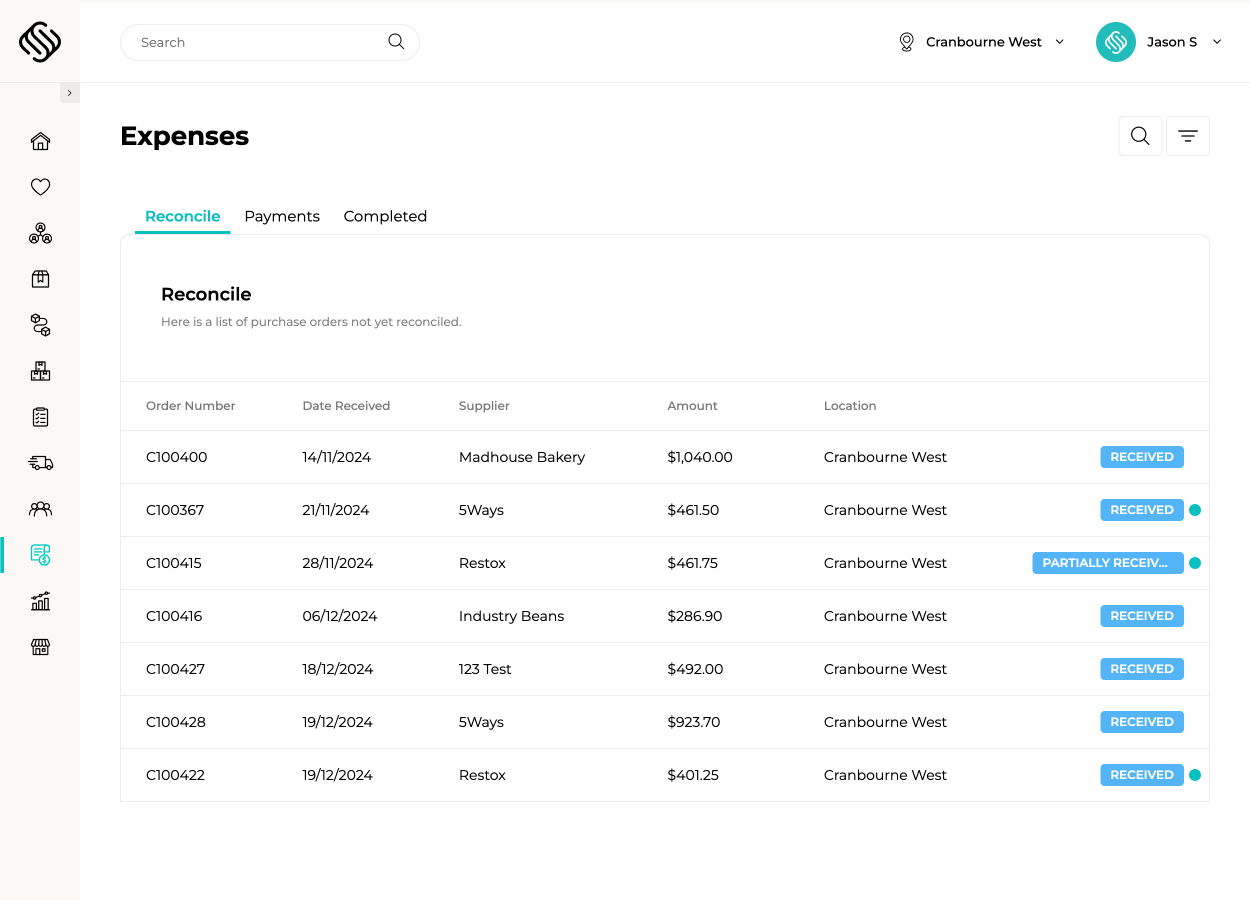
Stay ahead of costly surprises with AI-powered invoice scanning from Supply'd Intelligence. Perform automatic 3-way matching to ensure you only pay for what you ordered and received. Simply upload your invoices, and Supply'd Intelligence compares them against purchase orders and received stock to detect discrepancies and highlight price changes—instantly revealing their impact on your margins.
Easily handle price increases with Supply'd expense management software’s expense reconciliation. Update future buy prices, factor in shipping or supplier fees, and instantly see the impact on your margins. Then, schedule sell price changes to take effect automatically—so you stay profitable without lifting a finger.
Take full control of your supplier payments with Supply'd, ensuring you never miss a due date or accidentally pay twice. Set payment days to automatically assign payment schedules aligned with your terms, download ABA files for secure bulk payments, and easily track paid and unpaid invoices. With Supply'd expense management software, maintaining timely and accurate payments becomes effortless.
Seamlessly integrate your reconciled orders with your accounting platform, eliminating the need for manual bill creation. Automatically assign each order line to the correct GL Codes, and simply match payments from your bank feed to the bills generated by Supply'd. With Supply'd expense management software, keeping your books accurate and up-to-date is effortless.

Discover a transformative expense management system designed to simplify and streamline even the most complex business challenges, empowering you to operate with greater clarity and efficiency.
Book a demoSeamlessly integrate Supply'd expense management software with your current systems, enhancing cohesion and streamlining your business for greater efficiency.











Supply'd expense management software leverages our extensive expertise in the food and retail industries, combining it with cutting-edge technology to drive innovation.
Our difference lies not only in what we offer but in how we approach the needs of food and retail businesses. We combine innovative technology with deep industry understanding to create tailored expense management software solutions that drive measurable impact.
Supply'd eliminates the need for multiple plug-ins or additional systems by offering a comprehensive, end-to-end platform tailored to the food and retail sectors. This streamlined approach reduces expense management inefficiencies, manual workarounds, and complexity.
Unlike alternative expense management solutions with self-managed or automated support models, Supply'd provides responsive, human-centric customer service. You have direct access to decision-makers and proactive assistance, fostering trust and ensuring smooth implementation and ongoing success.
Supply'd is specifically designed for food and retail businesses, addressing your unique expense management needs. Its industry-specific features and insights deliver practical solutions where generic systems fall short.
Supply'd uses cutting-edge technology, avoiding the “old-school” limitations of some competitors. The expense management system grows seamlessly with you, offering scalability without requiring additional systems or major disruptions.
Supply'd is a specialised Food ERP System designed to replace spreadsheets and generic accounting add-ons. We combine manufacturing, warehousing, sales, and logistics into a single source of truth.

Supply'd Intelligence is the engine behind your smartest decisions—designed specifically for food & retail businesses. It forecasts demand, predicts sales and production needs, and powers automation across purchasing, invoicing, and delivery. Your data remains private and secure, with insights tailored exclusively to your business. Discover a smarter way to operate, driven by your data.
Learn moreYes. 3-Way Matching is the gold standard for inventory control. Supply'd compares the Purchase Order (what you ordered), the Goods Received (what arrived), and the Supplier Invoice (what you are charged). If they don't match, the system alerts you immediately.
Extremely accurate. Supply'd Intelligence reads PDF invoices line-by-line. It identifies products by matching SKU codes or descriptions against your catalogue, ensuring the right costs are assigned to the right products every time.
Yes. You can generate an ABA File (standard Australian banking file) from Supply'd. Upload this file to your business bank account to pay multiple suppliers in a single transaction, reducing bank fees and admin time.
The system flags it during the invoice scan. You can approve the new cost, and Supply'd will automatically recalculate your Cost of Goods Sold (COGS) and show you how the increase affects your profit margin on that product.
Yes. You can map product line via department or product, manually add lines for freight, levies, or non-inventory items and assign them to different General Ledger expense accounts before syncing to Xero.
No, it gives them superpowers. Instead of manually typing data from paper invoices, your bookkeeper simply reviews the "Approved" bills in Supply'd and syncs them to Xero/MYOB. It turns hours of data entry into minutes of review.
Yes. If you run multiple locations, Supply'd tracks expenses per venue. You can see exactly which location is spending the most on specific ingredients and compare profitability across your group.
Yes. You can set permissions so that a Head Chef or Store Manager can *receive* the goods, but only the Accounts Manager or Owner can *approve* the invoice for payment.
You can flag damaged or missing items by adding notes directly to the order within Supply'd. This creates a clear audit trail for your finance team, prompting them to raise the formal Credit Note in your accounting software before payment is made.
Yes. When the system detects a cost increase during invoice reconciliation, you can immediately Schedule a Price Change. This allows you to set new sell prices to take effect on a specific date, ensuring you protect your margins without needing to remember to update it later.