






Only Mine
Gourmet chocolate manufacturer.
View case studyKeep checks, results, evidence and corrective actions connected to the relevant supplier, product, batch, production run or location. Every record is timestamped and retained, making issues easier to investigate and audits easier to prepare for.
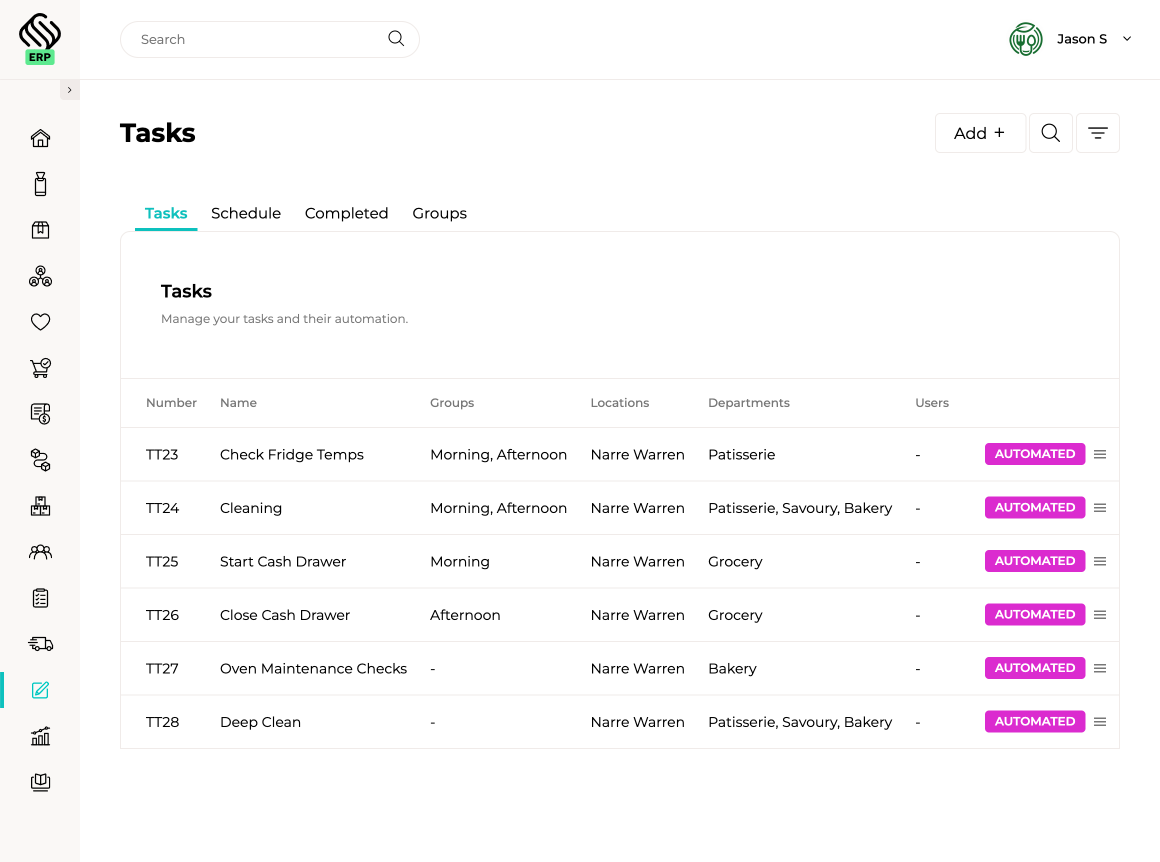
Replace paper checklists and disconnected food-safety logs with scheduled, assigned and repeatable quality tasks. Set checks to occur by group, frequency, department or location, then give teams a clear view of what is due, what has been completed and where follow-up is required.

Record the checks required when stock arrives, including temperature, condition, quantity and acceptance results. Supply’d keeps each result connected with the supplier, purchase order, product and batch, creating a clear receiving record before stock enters inventory.

Add configurable quality fields to production stages and runs so staff record important results while the work is happening. Capture cooking and cooling temperatures, metal detection results, weights, seal checks, pass-or-fail outcomes, notes and other production controls against the relevant batch.
Record your own training videos, create courses and topics, then assign them to the relevant employees, locations or roles. Supply’d tracks enrolment, progress and completion so managers can see who has completed required training and where follow-up remains. Preloaded Supply’d system training also helps new team members learn the platform faster.

Trace affected supplier batches through production, finished goods and customer deliveries. Supply’d helps your team identify impacted stock and customers quickly, complete targeted recalls and retain a clear record of every action taken.

Explore how food manufacturers, bakeries, wholesalers and retailers use Supply’d ERP to run their operations.
Book a demoSupply’d ERP is built around the workflows food manufacturers, distributors and retailers rely on every day.
Supply’d is built around the way food and retail businesses actually operate. We combine deep industry understanding with connected technology to deliver production management software that improves control, reduces manual work and connects teams across the operation.
Quality management software helps businesses record checks, manage food-safety tasks, retain supporting documents, track staff training and maintain traceability. Supply'd connects these records directly with receiving, production, inventory, batches, deliveries and daily operational tasks.
Yes. Supply'd is designed for food manufacturers, bakeries, butchers, wholesalers, distributors, retailers, central kitchens and other food businesses managing quality, food safety, traceability and training.
No. Quality information is recorded within the operational workflow it belongs to. Receiving checks stay with the receipt, production results stay with the production run, certificates stay with the batch, write-offs stay with inventory and notes remain attached to the relevant task.
Keeping quality records with the work they relate to avoids duplicate data entry and gives users the surrounding context. A temperature result can remain connected with the receipt or production batch instead of becoming an isolated record in another system.
Yes. Quality, food-safety and operational tasks can be scheduled to recur at the required frequency and assigned to the relevant locations, departments, teams or users.
Yes. One-off tasks can be created and assigned when an activity does not need to follow a recurring schedule.
Yes. Tasks can be assigned to specific sites, stores, factories, warehouses, kitchens or other operating locations.
Yes. Tasks can be directed to departments, teams, shifts or groups so the correct people see the work relevant to their area.
Yes. Tasks can be allocated to a specific user when individual responsibility is required.
Yes. Managers can see upcoming, completed and incomplete tasks, helping them identify work that still requires attention.
Yes. Cleaning schedules, opening checks, closing checks, equipment inspections and other recurring records can be completed digitally instead of on paper forms.
Yes. Opening, midday, closing and shift-based routines can be created as recurring tasks for the relevant location or team.
Yes. Cleaning tasks can be scheduled, assigned and completed digitally with notes and other supporting information retained against the task.
Yes. Equipment inspections and routine operational checks can be created as scheduled tasks and assigned to the appropriate employee, location or department.
Yes. Supply'd records when a task or check was completed and which user completed it.
Yes. Notes and relevant results can be recorded against the task so they remain connected with the activity being completed.
Supporting photos, files or other evidence can be retained against the relevant task where supported by the workflow.
Yes. Supported task and quality records can be reviewed or exported when required for management, customer or audit purposes.
Yes. Receiving workflows include quality checks so relevant information can be recorded before stock enters inventory.
Receiving checks can include temperature, product condition, quantity and acceptance information, depending on the product and workflow being used.
Yes. Temperatures can be recorded when chilled, frozen or temperature-sensitive goods are received.
Yes. Receiving results remain connected with the relevant supplier, purchase order, products and receipt.
Yes. Where batch information is recorded, receiving checks can remain connected with the relevant supplier batch and stock received.
Yes. Acceptance and other receiving outcomes can be recorded as part of the receipt workflow.
The receiving result can be recorded against the receipt. Once stock has entered inventory, any later damage, loss or disposal can be recorded through the relevant inventory write-off workflow.
Yes. Configurable fields can be added to production workflows so staff record required quality and food-safety results while production is being completed.
Yes. Quality fields can be included at the relevant point in the production workflow so results are captured when the related work occurs.
Yes. Cooking temperatures can be recorded within the relevant production run or stage using configurable production fields.
Yes. Cooling temperatures and related checks can be captured against the relevant production run or stage.
Yes. Metal detection results can be recorded through configurable fields within the production workflow.
Yes. Production fields can be used to record required weights, measurements and other results against the production run.
Yes. Seal, packaging and finished-product checks can be included within the relevant production stage.
Yes. Configurable fields can record pass-or-fail outcomes, measurements, temperatures, notes and other required production information.
Yes. Results recorded during production remain connected with the relevant production run and finished batch.
Yes. Actual finished quantities and yield are recorded within the production workflow, allowing teams to compare expected and actual output.
Yes. Production records can compare expected output with the actual result, helping teams identify process variation, waste and unexplained loss.
Yes. Certificates, reports and supporting documents can be stored against the batch they relate to.
Yes. Certificates of analysis can be uploaded and retained against the relevant supplier, ingredient or finished-product batch.
Yes. Supplier certificates and batch documents can remain connected with the relevant batch and receiving history.
Yes. Damaged, expired, contaminated or otherwise unusable inventory can be written off through the inventory workflow with the relevant quantity, reason and stock information recorded.
Yes. Where batch tracking is used, inventory write-offs can remain connected with the relevant product, batch, location and stock movement history.
Yes. Write-off reasons and supporting information can be recorded within the inventory adjustment workflow.
Yes. Businesses can create training courses, assign them to participants and track enrolment, progress and completion.
Yes. Businesses can create their own courses using training videos, topics and supporting content relevant to their operating procedures.
Yes. Your team can record and upload its own training videos for use within internal courses.
Yes. Courses can be organised into topics so training can be delivered in a clear sequence rather than as one enormous video nobody willingly finishes.
Yes. Courses can be allocated to selected participants according to their role or training requirements.
Yes. Managers can see whether assigned training has not started, is in progress or has been completed.
Yes. Completion records remain connected with the employee and assigned course.
Yes. Training progress allows managers to identify participants who have not started or completed their assigned courses.
Yes. Supply'd includes preloaded system training to help users learn the platform and make onboarding easier.
Yes. Relevant Supply'd training can be assigned to new users so they can learn the parts of the platform required for their role.
Yes. Internal courses can cover food-safety procedures, equipment use, production processes, cleaning routines, warehouse practices and other operating requirements.
Yes. Completion records identify the user who completed the task or check and when it was performed.
Yes. Operational records retain the relevant completion, user, date and workflow history so managers can review what occurred.
Yes. Authorised managers can maintain visibility across multiple sites, departments and operating areas.
Yes. User permissions can be configured so employees only see and complete the tasks and records relevant to their responsibilities.
Yes. Supply'd can trace where an affected ingredient or product batch was received, used, produced, transferred and sold.
Yes. Ingredient batches remain connected with the production runs and finished batches in which they were used.
Yes. Finished batches can be traced through inventory, fulfilment and sales orders to identify customers or locations that received the affected stock.
Yes. Supply'd can identify affected inventory still held across warehouses, stores, production areas and other stock locations.
Yes. Affected inventory can be managed through the relevant write-off and stock-adjustment workflows.
Yes. Customer and order information can be used to identify affected recipients and support communication with customers who received the recalled product.
Yes. Finished batches can be traced back through the production run to the ingredient and supplier batches used.
Yes. An ingredient batch can be traced forward into the production runs, finished batches, stock movements and customer orders it affected.
Yes. Supply'd can connect recurring tasks, receiving checks, production results, batch records, training and traceability across multiple locations while giving authorised managers central visibility.
Yes. Supply'd is suited to food businesses managing recurring food-safety tasks, receiving controls, production checks, certificates, staff training, batch traceability and product recalls across connected operational workflows.